Article
Successful website redesign is an engineering project that demands meticulous technical, UX, and content planning before a single visual element is designed.
Avoid costly, risky redesigns. Use this essential 4-phase checklist covering strategic content audits, technical SEO migration, performance benchmarking, and wireframing before touching the UI.
The Website Redesign Checklist I Use Before Touching Any UI
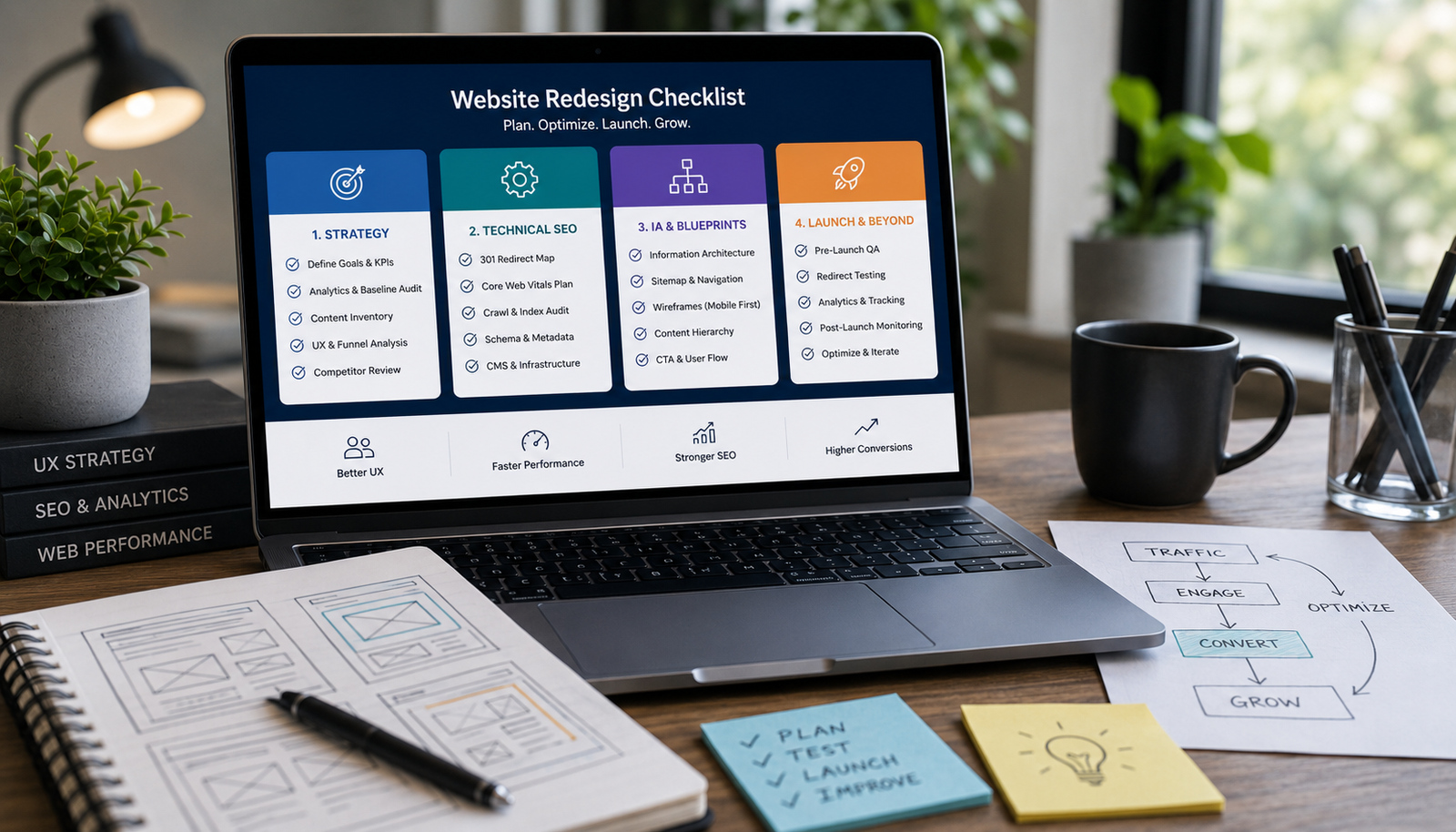
Website redesigns often trigger immediate conversations about visual appeal: new brand colors, updated typography, and modern graphics. However, for SaaS companies, e-commerce brands, founders, and service businesses, treating a redesign as purely an aesthetic update is the most expensive mistake you can make. Your website is a business asset—a machine built for lead generation, sales, and customer service. Therefore, a redesign should be treated as an engineering project focused on eliminating technical debt, reducing user friction, and optimizing core business performance. The most successful projects adhere to a rigorous planning methodology, often called Phase 0. This pre-development phase is where strategy, data, and technical requirements are locked down, ensuring that when the design and development teams engage, they are building on a validated blueprint. If you skip this deep planning stage, you risk launching a beautiful new site that generates fewer leads, runs slower, and loses years of accumulated search authority. This checklist provides the practical, four-phase framework I use to audit an existing website and architect a new, high-performing digital platform.
Phase 1: Strategic Audit and Goal Definition (The 'Why' and 'What')
Before any structural changes are considered, you must establish a clear, data-driven baseline of the current site's performance and define precisely how the new site will be measured for success.
1. Define Measurable Success Metrics (KPIs)
Goals like "increase brand awareness" are too vague. Every redesign goal must be quantifiable and tied directly to revenue or user experience improvements. Actionable Goal Setting:
- Conversion Rate Improvement: Identify a target percentage increase for primary conversion actions (e.g., boosting demo requests by 20% or reducing shopping cart abandonment by 10%).
- Core Web Vitals (CWV) Targets: Your new site must perform faster than the old one. Set specific goals for Google's performance metrics, primarily Largest Contentful Paint (LCP) (loading speed) and Interaction to Next Paint (INP) (responsiveness).
- Task Completion Rate: Measure the percentage of users successfully completing a crucial task (e.g., finding the pricing page, locating a support document). Aim to increase this rate by simplifying navigation.
- Bounce and Exit Rates: Target a reduction in bounce rate on high-intent pages (like product or service landing pages) by identifying and removing points of friction. Baseline Audit: Use tools like Google Analytics and Google Search Console to create a detailed 'before' snapshot. Document the current average conversion rates, top-performing pages, worst-performing pages (high exit/bounce rates), and current Core Web Vitals scores. This baseline is essential for proving the Return on Investment (ROI) post-launch.
2. The Comprehensive Content Inventory and Audit
A website redesign is a chance to retire technical and content debt. Do not assume all old content must be moved to the new site. Every piece of content should be audited for relevance, performance, and strategic alignment. The Content Decision Framework (Keep, Kill, Consolidate):
| Action Category | Criteria for Decision | Required Migration Action | Risk Mitigation |
|---|---|---|---|
| Keep | High traffic, high conversion, strong backlink profile, or core to the brand's offering. | Update copy/SEO and map to the new sitemap structure. | Preserve existing URL if possible; if not, secure with a 301 redirect. |
| Kill | Zero traffic, outdated information, duplicate or thin content, or irrelevant to current business goals. | Delete from CMS; immediately plan a 301 redirect to the nearest relevant category or parent page. | Reduces site bloat, maintenance, and search engine confusion. |
| Consolidate | Multiple pages covering the same or similar topic, resulting in fragmented SEO authority. | Merge the best elements into one comprehensive, authoritative page. | Redirect all old URLs to the new, merged master page using 301s. |
| Key Deliverable: A Content Inventory Spreadsheet that lists every current URL and its definitive new destination. This document is the bedrock of the entire SEO migration plan. |
3. Analyze Conversion Funnel Friction (UX Audit)
A redesign must be focused on making it easier for the user to complete the action you want them to take. This requires a deep dive into user behavior. Audit Actions:
- User Flow Mapping: Trace the path users take from initial entry (e.g., a Google search result) to final conversion (e.g., purchase or demo sign-up). Identify where drop-offs occur using funnel visualizations in Google Analytics.
- Heatmap and Session Analysis: Use tools like Hotjar or Microsoft Clarity to visually confirm where users are clicking, ignoring, or struggling. If users are trying to click non-interactive elements, it signals a UX confusion point that needs correction in the new design.
- CTA Hierarchy: Ensure every page has a clear primary, secondary, and tertiary Call-to-Action. A service page's primary CTA might be "Request a Quote," while the secondary might be "Download Case Study." If a user cannot find the next logical step, the funnel breaks.
Phase 2: Technical SEO and Infrastructure (Mitigating Traffic Loss)
The biggest financial risk during a redesign is the loss of organic search traffic. This phase ensures your new site is not only fast but also technically engineered to preserve and enhance your existing SEO authority. This is where the work of SEO Engineering & Technical SEO is non-negotiable.
1. The Critical 301 Redirect Map
A 301 redirect is a permanent, server-side instruction that tells search engines (and browsers) that an old URL has moved to a new address. Failing to implement this correctly is catastrophic. The 301 Strategy Checklist:
- Map All Changes: Use your Content Inventory (Phase 1) to generate a complete Old URL -> New URL list. This map must be validated before deployment.
- Redirect Chains are Forbidden: Ensure all redirects are direct. Avoid a situation where page-a redirects to page-b, and page-b then redirects to page-c. This slows down the crawl and dilutes link equity.
- Wildcard Redirects (Handle with Caution): For large categories or entire sections that are moving, you may use technical regular expression redirects, but these must be tested rigorously to ensure they don't redirect valuable pages to irrelevant destinations.
- Monitor 404s: Immediately after launch, monitor Google Search Console's Coverage report for a spike in 404 (Not Found) errors. Each 404 signals a missed redirect opportunity and lost traffic.
2. Core Web Vitals Optimization Plan
The redesign must be built for speed. Performance is a ranking factor and a direct driver of conversion. Performance Benchmarking:
- Audit LCP: Large element loading time is critical. The plan must prioritize rendering the main content block (LCP element) lightning-fast, often achieved through server-side rendering (SSR) or static site generation.
- Audit INP: Interactivity is key. The development plan must ensure minimal heavy, render-blocking JavaScript that delays the browser's response to user input.
- Technical Asset Planning: Define standards for image compression (using modern formats like WebP or AVIF), size constraints, and implementation of lazy loading for assets below the fold. The goal is not just to improve CWV scores, but to ensure the underlying architecture (whether it's a heavily optimized WordPress stack or a modern Next.js/React build) is fundamentally faster and more efficient than the legacy system.
3. CMS and Infrastructure Evaluation
Before building, evaluate whether your current Content Management System (CMS) or hosting environment can support the new design's features and performance requirements. Decision Points for Infrastructure:
- Scalability: If your business is growing quickly (especially e-commerce or SaaS), does the current platform handle increasing traffic without slowing down?
- Headless vs. Monolithic: For maximum speed, decoupling the frontend presentation (the UI) from the content backend (the CMS) is often required. This is the shift to a 'headless' system, common with React or Next.js development.
- Security and Maintenance: Audit the current CMS (e.g., WordPress) for plugin bloat, outdated themes, and security risks. The redesign should aim to reduce reliance on numerous third-party plugins by building essential functionality natively.
Phase 3: Information Architecture and Functional Blueprints
With strategy and technical requirements finalized, this phase focuses on structure. You move from abstract goals to concrete blueprints using Information Architecture (IA) and wireframing.
1. Designing the New Information Architecture (Sitemap)
The Information Architecture defines how all pages are organized and linked. A clean IA makes the site intuitive for users and highly crawlable for search engines.
- Shallow Hierarchy: Create a shallow, logical structure. Users should ideally reach any high-value page in three clicks or less. Deep nesting confuses both people and crawlers.
- Clear Naming Conventions: Ensure every category and link label uses universally understood language aligned with the user's search intent, rather than internal business jargon.
- Internal Linking Strategy: Plan the internal link flow, ensuring high-authority pages (e.g., core service pages) receive links from relevant content (e.g., deep blog posts). This distributes link equity effectively.
2. Functional Wireframing for Conversion
Wireframes are black-and-white, function-focused diagrams of each page template. They prevent aesthetic decisions from derailing core usability.
- Mobile-First Blueprint: Design the wireframes starting with the mobile viewport. This forces the prioritization of the most essential content and CTAs, ensuring the most important elements are not hidden or pushed below the fold on smaller screens.
- Content Hierarchy Validation: Use the wireframe to visually enforce the content hierarchy defined in Phase 1. Is the unique value proposition the largest heading? Is the primary conversion button placed immediately after the trust signals?
- Define Interaction States: Wireframes should define functional logic, such as: What does the navigation look like when scrolled? What happens when a user submits a form with missing fields? This detail provides clear specifications for the developer and QA team. Note: Changes made at the wireframing stage are vastly cheaper and faster to implement than changes made after the design and development teams have started coding the final User Interface.
Phase 4: Launch Readiness and Post-Launch Audit
The moment of launch is a technical migration point, not an end goal. Rigorous testing is mandatory to ensure all the planning protects your asset.
1. The Go-Live Technical Checklist
This checklist ensures all essential technical components are active and correctly configured immediately before the DNS switch.
- Final 301 Redirect Testing: Use a server-side redirect checker to test a large sample of old URLs, confirming they return a 301 status code and land on the intended new page. This is the single most important pre-launch check for SEO.
- Indexing and Canonical Tags: Verify that the development site's robots.txt has been replaced with the live version (which allows crawlers). Check that all canonical tags correctly point to the preferred version of the new URLs.
- Structured Data Validation: Use Google tools to validate that crucial Schema Markup (e.g., Organization, FAQ, or Product) is implemented correctly on high-value pages to facilitate rich search results.
- Functional QA and Forms: Every lead generation form, search bar, filter, and interactive element must be tested across Chrome, Firefox, Safari, and multiple mobile devices. A broken form is an immediate loss of revenue.
- Analytics Implementation: Confirm that all tracking scripts (Google Analytics 4, Search Console ownership, and any conversion pixels) are installed and firing correctly on the new site structure.
2. Post-Launch Monitoring and Recalibration
A website is a living product. The first month post-launch is dedicated to performance verification and bug resolution based on real-world data.
- Search Console Monitoring (0-7 days): Aggressively monitor the Coverage and Performance reports in Google Search Console for any 404 spikes or indexing issues. Resolve redirect errors immediately.
- Core Web Vitals Field Data (30 days): Wait for Google to gather sufficient Field Data (Real User Monitoring) and confirm that the new LCP, INP, and CLS scores meet or exceed the performance targets set in Phase 1.
- Conversion Funnel Analysis: Compare the live conversion rates against the baseline established pre-launch. If a critical KPI is underperforming, use heatmaps and session recordings to diagnose and swiftly iterate on the point of friction.
- User Feedback Loop: Establish a system for quickly gathering and prioritizing user feedback (e.g., customer support tickets, sales team feedback) related to new site usability, treating every report as a potential opportunity for optimization.
Transform Your Website into a High-Performance Asset
A professional website redesign is a fundamental business investment, not just a design project. By following this planning checklist, you move beyond subjective aesthetics and ground the entire project in data, conversion optimization, and technical stability. This engineering-first approach ensures that your new platform is not only visually modern but also structurally sound, minimizing risk and driving measurable improvements in leads, speed, and search visibility. If your current website is hindering your growth and you need a strategic partner to manage this complex technical transition, the time to plan is now. Ready for a Performance-Driven Website Redesign? If you are planning a comprehensive website redesign for your business and need to ensure the project minimizes risk and maximizes measurable business outcomes, leverage professional expertise in both Website Design & Development and SEO Engineering & Technical SEO. Stop guessing. Get a strategic, engineering-led plan for your next site redesign that minimizes technical risk and guarantees measurable conversion performance improvements.
Frequently Asked Questions
Why is 'Phase 0' planning more important than visual design?
Phase 0 ensures that the project is anchored by measurable business objectives and technical stability (like SEO and speed). Skipping it leads to costly mid-project changes and performance failure post-launch.
What are the most crucial steps for technical SEO during a redesign?
The most crucial steps are creating a perfect, granular 301 redirect map for every changing URL, updating your canonical tags and structured data, and benchmarking Core Web Vitals targets.
How do Core Web Vitals relate to the redesign process?
Core Web Vitals (LCP, INP, CLS) are direct metrics of user experience and site speed used by Google. A redesign must actively target improved CWV scores to retain search ranking authority and reduce user frustration.
What is the primary purpose of wireframing in the pre-UI phase?
Wireframing focuses solely on the functional hierarchy and conversion flow of the new website, preventing aesthetic debates from distracting the team from crucial layout and usability decisions.
How can I check if my old site's URLs are properly redirected?
You must use server-side tools or dedicated redirect mapping software to test the old URLs and confirm they return a 301 status code pointing directly to the intended new URL, checking especially the high-traffic pages.
What is the biggest SEO risk during a website redesign?
The biggest risk is failing to properly map old URLs to new URLs using 301 redirects, which leads to 404 errors and catastrophic loss of organic search traffic and ranking authority.