Article
The right website architecture depends on how often your business updates content, how much control your team needs, and how you plan to grow.
Compare static websites and CMS websites across speed, editing, SEO, maintenance, cost, security, and long-term business flexibility.
Static Website vs CMS Website: Which One Should a Business Choose?
Choosing between a static website and a CMS website is one of the first important decisions in a business website project. It affects how fast the website can be, how easily your team can update content, how SEO content will be managed, how maintenance works, and how flexible the website will be later. A static website and a CMS website can both be good choices. The right answer depends on what your business needs. Some businesses need a fast, simple website that rarely changes. Others need a content system where the team can publish blogs, update services, manage case studies, add landing pages, and improve SEO regularly. The mistake is choosing based only on what sounds modern or familiar. The better approach is to choose based on content workflow, business goals, maintenance capacity, SEO strategy, and future growth.
The Simple Difference
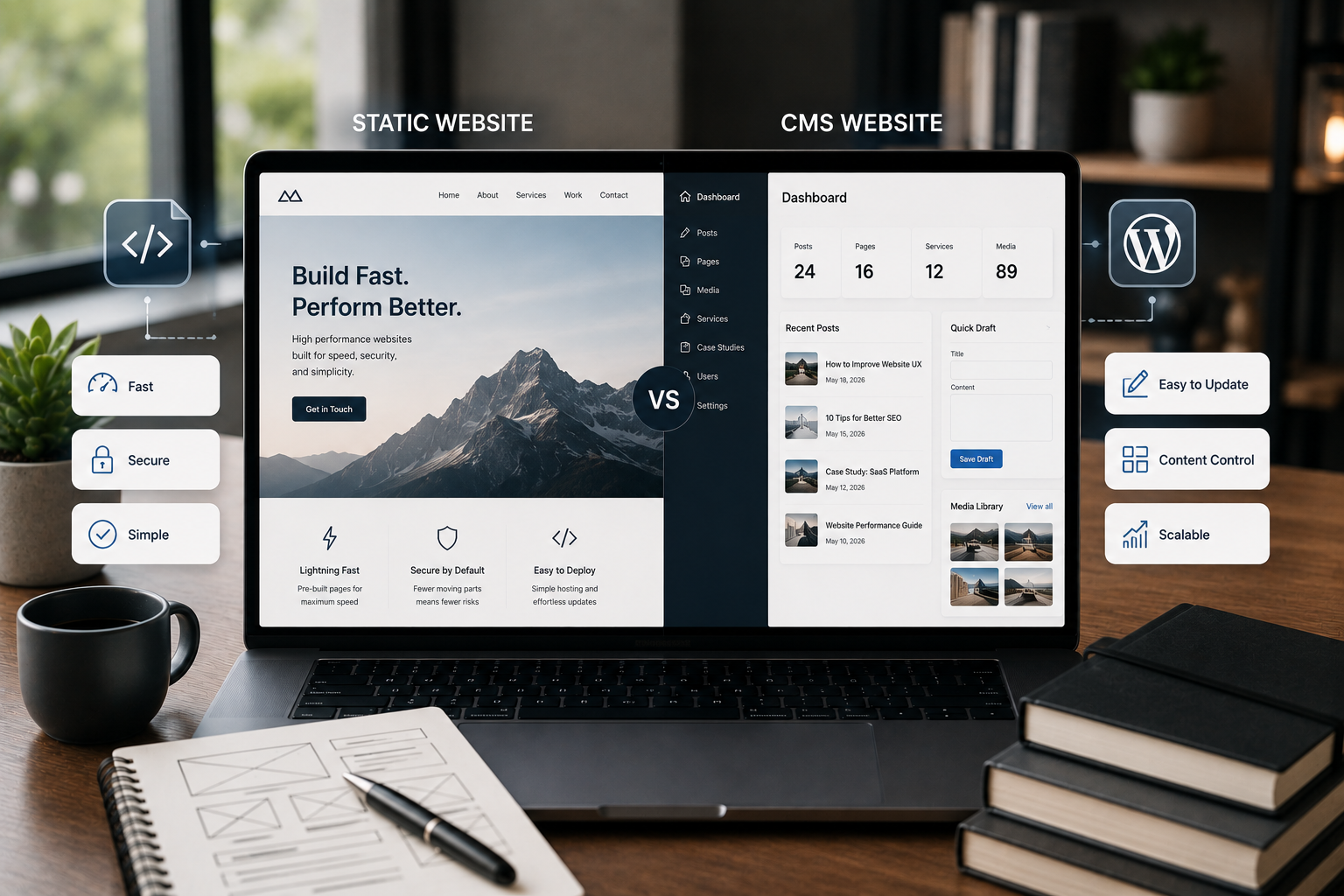
A static website is usually built from fixed files. The pages are created by developers and served directly to visitors. If content needs to change, a developer or technical workflow usually updates the files and redeploys the site. A CMS website uses a content management system. It gives the business an admin area where pages, posts, images, SEO fields, categories, and other content can be edited without touching code. The simplest comparison is this: A static website is simpler and often faster. A CMS website is easier to update and manage. That does not mean static websites cannot be advanced. It also does not mean CMS websites must be slow. It means they are designed around different priorities.
What Is a Static Website?
A static website is made of prebuilt pages. These pages are served as HTML, CSS, JavaScript, and assets like images and fonts. Static websites are often used for:
- Small business websites
- Landing pages
- Portfolio websites
- Documentation sites
- Product launch pages
- Simple service websites
- Campaign pages
- Websites with content that rarely changes A static website can be built with plain HTML, modern frontend frameworks, static site generators, or frameworks like Next.js when static generation is used. The main benefit is simplicity. There is usually no database, no traditional admin dashboard, and fewer moving parts.
What Is a CMS Website?
A CMS website uses a system that stores and manages content. Common CMS examples include:
- WordPress
- Headless CMS platforms
- Shopify CMS features
- Webflow CMS
- Custom CMS systems
- Contentful-style systems
- Strapi-style systems A CMS website is useful when the business needs to update content regularly. A team can manage:
- Pages
- Blog posts
- Images
- Service pages
- Case studies
- Products
- FAQs
- Landing pages
- SEO titles
- Meta descriptions
- Categories
- Authors
- Reusable content The main benefit is editing control. A CMS makes the website easier to manage after launch.
Performance: Static Websites Usually Have an Advantage
Static websites can be very fast because the pages are already built before the visitor arrives. There is no need to query a database for every page request. There is no heavy admin system involved in serving the frontend. The hosting setup can be simple and efficient. This makes static websites attractive when performance is a priority. However, speed is not automatic. A static website can still be slow if it has:
- Oversized images
- Too much JavaScript
- Heavy animations
- Poor font loading
- Unoptimized videos
- Too many tracking scripts
- Weak hosting or delivery setup A CMS website can also be fast when built properly. For example, a well-optimized WordPress site with good hosting, caching, clean theme code, optimized images, and careful plugin choices can perform well. So the better comparison is not “static is fast and CMS is slow.” The better comparison is: Static websites usually start with fewer performance risks. CMS websites need more performance planning.
Editing: CMS Websites Win for Non-Technical Teams
If your team needs to update the website regularly, a CMS is usually the better choice. A CMS website lets non-technical users edit content without asking a developer for every small change. This matters for businesses that publish or update:
- Blog posts
- Service pages
- Case studies
- Team profiles
- Product content
- Landing pages
- FAQs
- Resource pages
- Event pages
- Offers or announcements If the website is part of your marketing system, editing control becomes important. A static website can still have an editing workflow, but it usually requires a technical process unless it is connected to a CMS or content source. For many business owners, that is the key difference. If content changes often, a CMS saves time and reduces dependency on developers.
SEO: Both Can Work, but the Workflow Is Different
Static websites and CMS websites can both support SEO. SEO depends on structure, content quality, speed, metadata, internal linking, mobile usability, and technical setup. The platform alone does not guarantee results. A static website can be strong for SEO because it can be fast, clean, and easy for search engines to read when built properly. A CMS website can be strong for SEO because it supports ongoing publishing and content management.
Static Website SEO Strengths
Static websites can support:
- Fast page loading
- Clean HTML output
- Simple URL structure
- Easy hosting setup
- Fewer plugin-related issues
- Strong performance foundations This is useful for small websites, landing pages, and websites with stable content.
CMS Website SEO Strengths
CMS websites can support:
- Blog publishing
- Easy metadata editing
- Content categories
- Internal linking
- Author pages
- Case study management
- Service page updates
- Large content libraries
- SEO plugin workflows
- Structured content updates This is useful when SEO is an ongoing growth strategy. If your business plans to publish content regularly, a CMS usually makes SEO management easier.
Maintenance: Static Is Simpler, CMS Needs More Care
Maintenance is another major difference. A static website usually has fewer moving parts. There may be no database, no admin login, and fewer security risks from plugins or dynamic systems. Maintenance may include:
- Updating dependencies
- Fixing bugs
- Updating content through code
- Checking performance
- Updating scripts or integrations
- Renewing hosting and domains A CMS website needs more ongoing care. CMS maintenance may include:
- Core updates
- Plugin updates
- Theme updates
- Security monitoring
- Backups
- Database health
- User roles
- Spam protection
- Performance cleanup
- Content workflow management This does not mean CMS websites are bad. It means they need a maintenance plan. For a business that needs editing and publishing, that extra maintenance can be worth it.
Security: Static Websites Have Fewer Attack Surfaces
Because static websites usually do not have a database or admin panel, they often have fewer security risks. There is less to attack. A CMS website has more moving parts, especially when it includes user logins, plugins, themes, forms, comments, ecommerce features, or custom integrations. Common CMS security areas include:
- Admin login protection
- Plugin vulnerabilities
- User permissions
- Form spam
- Database backups
- Hosting security
- Theme updates
- Malware scanning Again, this does not mean CMS websites are unsafe. It means they must be maintained properly. If your business chooses a CMS, security should be part of the plan from the beginning.
Cost: Compare the Whole Lifecycle
Static websites can sometimes be cheaper to host and maintain because they are simpler. But if every content update requires developer time, long-term content changes can create extra cost. CMS websites may cost more to build or maintain because they need admin setup, content modeling, security, updates, and sometimes plugin management. But they can reduce the cost and delay of regular content updates. So the real cost depends on usage. Do not compare only the launch cost. Compare:
- Initial design and development
- Hosting
- Maintenance
- Content updates
- SEO publishing
- Security
- Future pages
- Integrations
- Redesign needs
- Team workflow A static website may be cost-effective for a stable website. A CMS website may be cost-effective for a growing content system.
When a Static Website Makes Sense
A static website can be the right choice when the website content is stable. Choose a static website when:
- The website has a small number of pages
- Content rarely changes
- Speed and simplicity are priorities
- No team editing is required
- There is no blog or content publishing plan
- The site is mostly informational
- Security simplicity matters
- The business wants a lightweight setup Examples include:
- Simple portfolio website
- Startup landing page
- Event landing page
- Small service website
- Product announcement page
- Documentation site
- Campaign microsite A static website is a good fit when the website does not need a full content management workflow.
When a CMS Website Makes Sense
A CMS website is better when the business needs control over content. Choose a CMS website when:
- The team needs to edit pages
- Blogs or articles will be published
- SEO content is part of the growth plan
- Service pages will change over time
- Case studies need to be added
- Products, resources, or FAQs need management
- Multiple people need access
- Content needs categories or structured fields
- The website will grow over time Examples include:
- Service business website
- Blog-driven website
- Portfolio with case studies
- Ecommerce content site
- SaaS marketing website
- Resource library
- News or updates website
- Multi-location business website A CMS website is the better choice when the website is not just a one-time build.
The Hybrid Option: Static Frontend With CMS Content
The choice is not always only static or CMS. A modern website can use a hybrid approach. For example, a website can use a CMS for content editing and a static or modern frontend for fast page delivery. This is often called a headless CMS or static generation workflow. In this setup:
- The business edits content in a CMS
- The frontend is built separately
- Pages can be generated for performance
- Developers control the design and frontend structure
- The team still gets content editing control This can be useful for businesses that want both performance and editing flexibility. A hybrid setup may use tools like Next.js, React, WordPress as a headless CMS, or another content platform. The tradeoff is complexity. Hybrid setups need more planning, but they can be powerful when the business needs both speed and content control.
Static vs CMS Decision Checklist
Use this checklist before choosing. Choose static if:
- Content rarely changes
- The website is small
- Speed is a top priority
- Editing will be handled by a developer
- There is no blog or content growth plan
- The site does not need user roles
- The business wants a simple technical setup Choose CMS if:
- Your team needs to edit content
- You plan to publish blogs
- SEO content will grow over time
- You need service or case study management
- You want reusable content structures
- Multiple users need access
- The website will become a content asset Choose hybrid if:
- You need CMS editing
- You also want a fast custom frontend
- The site needs strong SEO structure
- The business has a long-term content strategy
- The project can support more technical planning
Common Mistakes Businesses Make
Choosing Static When Content Will Change Often
A static website can become frustrating if the business later needs regular updates. If every small change needs a developer, the website becomes harder to keep current.
Choosing CMS When the Website Is Very Simple
A CMS may be unnecessary for a small website that rarely changes. Extra admin features, plugins, and maintenance may not be worth it for a simple static presence.
Ignoring SEO Content Plans
If SEO is part of the growth strategy, content publishing should be planned before choosing architecture. A CMS can make ongoing SEO easier, while static can work well for stable SEO landing pages.
Forgetting Maintenance
Every website needs maintenance. Static sites need technical updates. CMS websites need admin, plugin, security, and content workflow care. The difference is the type of maintenance.
Choosing Based on Trends
A website should be chosen based on business needs, not trends. A modern static site is not automatically better. A CMS is not automatically outdated. The right choice is the one your business can use and grow with.
Need Help Choosing the Right Website Structure?
If you are planning a new business website and are unsure whether it should be static, CMS-powered, or hybrid, the decision should start with your content workflow and growth plan. Through Website Design & Development, I can help plan a website structure that balances performance, editing control, SEO, maintenance, and long-term flexibility. The goal is not just to launch a website. The goal is to build the right foundation for how your business will actually use it.
Final Recommendation
A static website is best when the website is simple, fast, stable, and rarely edited. A CMS website is best when the business needs content control, publishing, SEO growth, and ongoing updates. A hybrid approach is best when the business wants CMS editing with a fast custom frontend. Before choosing, answer these questions:
- How often will the content change?
- Who will edit the website?
- Will the business publish blogs or resources?
- Is SEO an ongoing strategy?
- How many pages will the website need?
- Will case studies or services be added later?
- What maintenance can the business handle?
- Will the site need custom features in the future? The right website architecture should support the business after launch, not only look good on launch day.
FAQ
What is the main difference between a static website and a CMS website?
A static website is built from fixed files and usually needs developer updates, while a CMS website includes an admin system that lets non-technical users manage content. The main difference is editing workflow. Static sites are simpler, while CMS sites are easier for teams to update.
Is a static website better for performance?
Static websites can be very fast because they do not need to generate pages dynamically for every visitor, but performance still depends on hosting, images, scripts, and development quality. A static site can still become slow if it is built with heavy assets or poor frontend structure.
When should a business choose a CMS website?
A business should choose a CMS website when it needs regular content updates, blog publishing, team editing, service pages, product content, landing pages, or structured SEO growth. A CMS is especially useful when the website is part of ongoing marketing, not just a fixed online brochure.
Which is better for SEO, static websites or CMS websites?
Both can be good for SEO. Static websites can be fast and clean, while CMS websites are stronger for publishing, updating, and managing larger content structures. The best SEO choice depends on whether your business needs stable pages or ongoing content growth.
Can a website be both static and CMS-powered?
Yes. A hybrid or headless setup can use a CMS for content editing while generating fast frontend pages through modern frameworks or static site generation. This can give the business editing control while keeping the frontend fast and flexible.