Article
A premium Shopify store comes from clear branding, strong product pages, custom theme sections, clean performance, and careful app choices.
Learn how to make a Shopify store feel premium with better design, product pages, theme sections, performance, and fewer unnecessary apps.
How to Make a Shopify Store Look Premium Without Installing 20 Apps
A Shopify store does not become premium because it has more apps. Many store owners try to improve their store by installing one app after another. One app for product tabs. Another for badges. Another for reviews. Another for upsells. Another for popups. Another for sliders. Another for trust icons. Another for size charts. Another for bundles. Another for custom sections. At first, this feels useful. Each app solves a small problem. But over time, the store becomes heavier, harder to manage, and less consistent. The design starts to feel patched together. Pages load more slowly. Mobile experience suffers. The admin becomes confusing. The brand does not feel cleaner. It only feels busier. A premium Shopify store is not built by stacking tools. It is built by making better design, content, theme, and performance decisions. The goal is not to avoid apps completely. Shopify apps are useful when they solve real business problems. The goal is to stop using apps as a replacement for thoughtful store design.
Premium Does Not Mean Complicated
A premium store usually feels simple, clear, and intentional. It does not overload the visitor with popups, floating widgets, crowded banners, and too many badges. It uses space well. It explains products clearly. It has strong photography. It guides the buyer toward the right decision. It feels consistent from homepage to product page to checkout. A store can feel premium when it has:
- Clear brand positioning
- Strong product presentation
- Clean typography
- Consistent spacing
- Helpful product content
- Simple navigation
- Fast page loading
- Trust signals in the right places
- Mobile-friendly design
- A smooth checkout path None of these automatically require twenty apps. Many of these improvements should come from the theme, content structure, and design system.
The Problem With Installing Apps for Every Small Feature
Apps are one of Shopify’s strengths. They help stores add functionality without building everything from scratch. But app bloat becomes a problem when apps are used for small visual changes or simple layout features that could be handled inside the theme. App bloat can create issues like:
- Slower page loading
- Extra JavaScript and CSS
- Conflicting design styles
- Duplicate features
- Harder maintenance
- Higher monthly costs
- More tracking scripts
- Poor mobile experience
- Inconsistent admin workflows
- Dependency on third-party app settings The store may still work, but it starts to feel less controlled. A premium store needs control. It should not feel like ten different tools are fighting for attention on the same page.
Start With a Store Experience Audit
Before installing another app, review the existing store. Look at the full customer journey:
- Homepage
- Collection pages
- Product pages
- Cart
- Checkout
- Search
- Navigation
- Mobile experience
- Footer
- Policy pages
- Confirmation emails Then ask:
- Where does the store feel generic?
- Where does the buyer need more clarity?
- Which app features are actually useful?
- Which app features are only decorative?
- Which parts feel inconsistent with the brand?
- Which pages feel slow or crowded?
- What questions does the buyer still have before purchasing? This audit usually shows that the store does not need more apps. It needs better structure.
Use Custom Theme Sections Instead of Extra Layout Apps
Shopify themes can support reusable sections. With a good theme setup, many visual blocks can be handled directly inside the theme. Instead of installing apps for every design section, you can create custom Shopify theme sections for repeated content needs. Useful custom sections may include:
- Hero banners
- Featured collection blocks
- Product benefit grids
- Before and after sections
- Brand story sections
- Image and text layouts
- Trust sections
- FAQ blocks
- Comparison tables
- Ingredient or material sections
- Review highlights
- Delivery information blocks
- Size guide blocks
- CTA sections These sections can be designed to match the brand and reused across the store. This keeps the store cleaner because the layout is managed inside the theme instead of being controlled by multiple apps.
Product Pages Should Answer Buyer Questions
A premium Shopify product page does not only show images, price, and an add-to-cart button. It helps the buyer understand the product and feel confident. Many Shopify stores look generic because every product page follows the same basic template without enough context. A better product page may include:
- Clear product title
- Short value-focused summary
- Strong image gallery
- Key benefits
- Product details
- Materials or ingredients
- Size or compatibility information
- Delivery and returns
- FAQs
- Product comparison
- Trust signals
- Related products
- Clear call-to-action The right sections depend on the product. A skincare product may need ingredients, use instructions, skin type guidance, and FAQs. A clothing product may need size, fit, fabric, care, and returns. A technical product may need specifications, compatibility, setup, and warranty information. A premium home product may need materials, craftsmanship, delivery, and styling guidance. A product page feels premium when it removes buyer doubt.
Collection Pages Need More Than a Product Grid
A basic collection page often shows a grid of products and filters. That may be enough for very simple stores, but it often feels generic. A stronger collection page can guide customers better. It may include:
- A clear collection heading
- Short collection description
- Helpful filters
- Sorting options
- Featured product callouts
- Buying guidance
- Related collections
- FAQ section
- Internal links
- SEO-friendly content This helps both users and search engines understand the collection. For example, instead of only showing “All Products,” a premium store can organize products by use case, collection, material, customer type, or problem solved. Good collection pages make browsing feel curated.
Branding Should Be Built Into Every Section
A premium Shopify store should feel like one brand, not a theme with a logo added. Branding includes:
- Typography choices
- Image style
- Spacing
- Button language
- Product copy tone
- Section hierarchy
- Color usage
- Icon style
- Checkout reassurance
- Microcopy
- Navigation labels
- Empty states and error messages Surface-level branding is easy. Real branding shows up in the details. For example, the same brand voice should appear in product descriptions, buttons, FAQs, checkout notes, and policy summaries. The same visual rhythm should appear across homepage, product pages, and collection pages. Consistency creates trust.
Use Fewer Apps, But Choose Better Ones
The answer is not to remove every Shopify app. Some apps are valuable and necessary. A store may need apps for:
- Reviews
- Email marketing
- Subscriptions
- Loyalty programs
- Product bundles
- Search and filtering
- Shipping logic
- Returns
- Analytics
- Feeds and integrations The key is to choose apps carefully. Before installing an app, ask:
- Does this app solve a real business problem?
- Is this feature needed now?
- Can the theme handle this instead?
- Will the app slow down important pages?
- Does it match the store design?
- Does it duplicate another app?
- Is it easy for the team to manage?
- What happens if the app is removed later? A premium store uses apps strategically. It does not depend on apps for every design decision.
Performance Is Part of Premium Design
A slow store does not feel premium. Even if the design looks beautiful, slow pages create frustration. This is especially important on mobile, where buyers may be browsing with weaker connections or less patience. Shopify performance can be affected by:
- Too many apps
- Heavy images
- Large videos
- Unused scripts
- Tracking pixels
- Complex theme code
- Third-party widgets
- Large sliders
- Overloaded homepage sections A premium store should feel quick, smooth, and easy to use.
Practical Performance Improvements
Start with:
- Compressing images
- Using the right image sizes
- Removing unused apps
- Reviewing third-party scripts
- Avoiding unnecessary sliders
- Keeping homepage sections focused
- Testing product pages separately
- Checking mobile performance
- Avoiding excessive animations
- Keeping theme code clean Performance is not only a technical issue. It is part of the customer experience.
Mobile Experience Should Lead the Design
Many ecommerce buyers browse from mobile devices. A Shopify store that only looks premium on desktop is not finished. Mobile design should make it easy to:
- Understand the product quickly
- Browse collections
- Use filters
- View images
- Select variants
- Add to cart
- Read delivery information
- Complete checkout Common mobile issues include:
- Huge banners pushing products too low
- Hard-to-tap buttons
- Crowded product sections
- Slow image loading
- Sticky widgets covering content
- Popups interrupting browsing
- Filters that are difficult to use
- Long product pages with weak structure A premium mobile experience is focused and easy. Before adding more apps, test the store on a real phone. Browse like a customer. Find a product, compare options, add to cart, and continue to checkout. That process will show more than a desktop design review.
Trust Signals Should Be Clear, Not Loud
Many stores add multiple trust badge apps because they want the site to feel safe. But trust does not come from badges alone. Trust comes from clarity. Useful trust elements include:
- Clear delivery information
- Return policy summary
- Secure checkout messaging
- Real support contact details
- Product FAQs
- Consistent branding
- Professional product images
- Clear product specifications
- Honest availability information
- Clean checkout experience Trust signals should be placed where buyers need reassurance. For example, delivery and return information belongs near product decisions. Secure payment reassurance belongs near checkout. Product details belong on the product page, not hidden in policy pages. A premium store explains important details without shouting.
SEO Structure Should Be Planned Inside the Theme
A Shopify store that looks premium should also be structured well for search. Technical SEO is not only about installing an SEO app. Apps can help with metadata or structured data, but the store still needs a clean content and page structure. Important SEO areas include:
- Product titles
- Product descriptions
- Collection descriptions
- Meta titles
- Meta descriptions
- Image alt text
- Internal linking
- Heading structure
- URL structure
- Schema support
- Page speed
- Mobile usability
- Duplicate content control A custom Shopify theme can support SEO by making content sections easier to manage and keeping page structure clean. For example, collection pages can include useful content without making the page cluttered. Product pages can include FAQs, specifications, and internal links where appropriate. Image fields can encourage better alt text. SEO should be built into the store experience, not added as an afterthought.
Avoid Design Features That Only Look Premium for a Moment
Some design features look impressive at first but hurt the buying experience. Be careful with:
- Too many animations
- Full-screen popups
- Auto-playing videos
- Large sliders
- Overloaded announcement bars
- Excessive badges
- Floating widgets
- Too many upsell blocks
- Complex product tabs
- Hidden important information Premium design is not about adding more. It is about making the right things easier to see. A store feels better when the buyer can understand the offer, trust the brand, and take action without friction.
Shopify App Audit Checklist
Use this checklist before installing another app:
- Is the app solving a real problem?
- Is the feature already available in the theme?
- Can a custom theme section handle it better?
- Does the app load scripts on every page?
- Does it affect mobile performance?
- Does it duplicate another app?
- Is the design consistent with the brand?
- Is the app easy to manage?
- Is the monthly cost justified?
- Would removing it break an important workflow?
- Is it needed for marketing, operations, or conversion?
- Does it support the long-term store plan? This helps separate useful apps from unnecessary clutter.
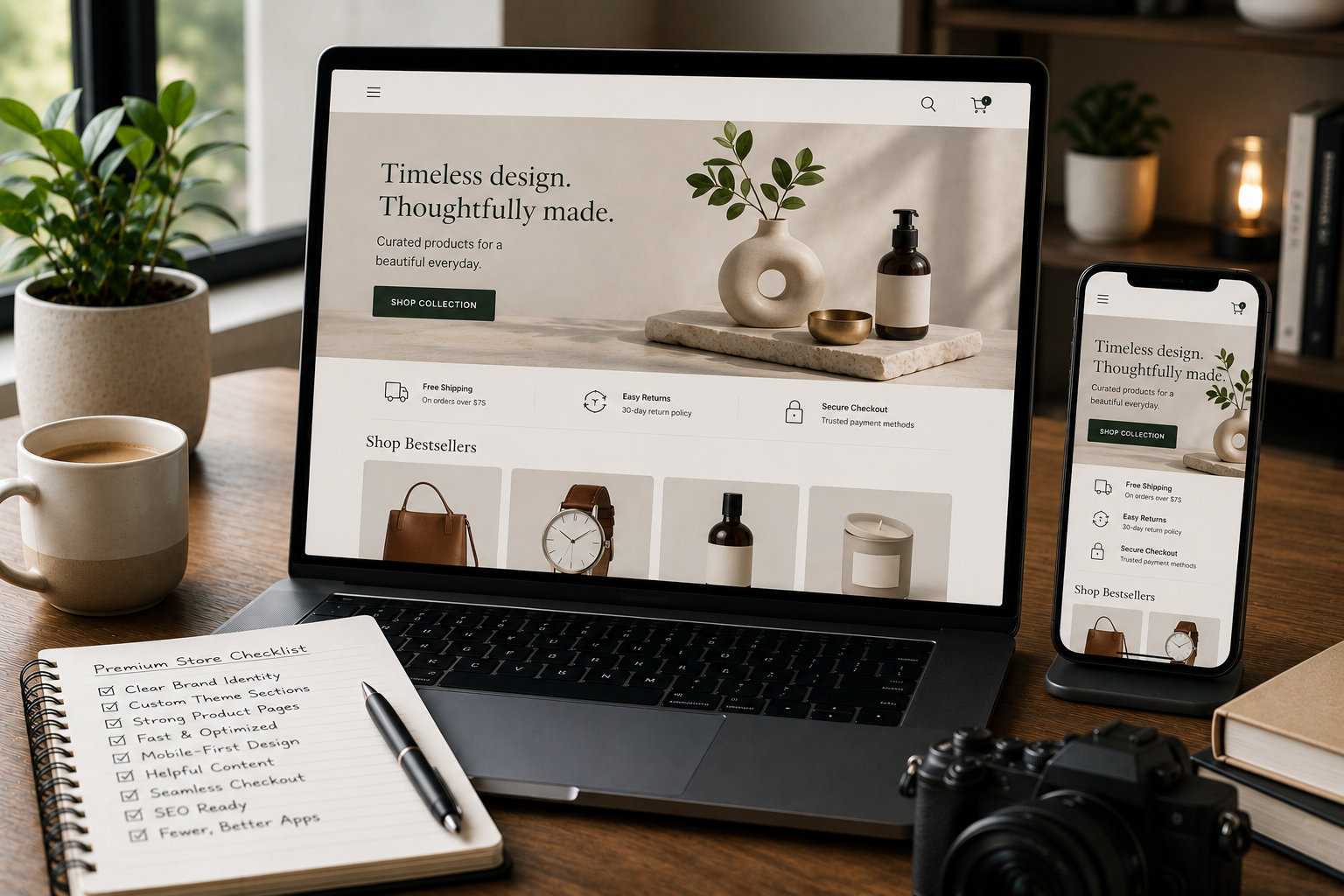
Premium Shopify Store Checklist
A premium Shopify store should have:
- Clear brand direction
- Strong homepage hierarchy
- Custom theme sections
- Useful product page content
- Helpful collection pages
- Simple navigation
- Mobile-first layout
- Fast loading pages
- Controlled app usage
- Clear trust signals
- SEO-friendly structure
- Consistent typography and spacing
- Clean checkout path
- Product images that support decisions
- Easy content management This does not require twenty apps. It requires better planning.
Need a Shopify Store That Feels Premium and Stays Clean?
If your Shopify store looks generic or depends on too many apps for simple design features, the issue may be the theme structure. Through Shopify Development, I can help create a cleaner Shopify store with custom theme sections, stronger product pages, better collection layouts, improved performance, and a more consistent brand experience. The goal is to make the store feel premium without making it heavy, confusing, or difficult to manage.
Final Recommendations
A premium Shopify store is built through clarity, consistency, and control. Before installing more apps, review:
- Product page structure
- Collection page experience
- Theme sections
- Mobile layout
- Brand consistency
- Store speed
- App stack
- Trust signals
- SEO structure
- Checkout path Use apps when they solve real business problems. Use custom theme sections when the store needs reusable branded design. Use better content when buyers need more confidence. The cleanest Shopify stores are not the ones with the most apps. They are the ones where every section has a purpose.
FAQ
Can a Shopify store look premium without many apps?
Yes. A premium Shopify store can be built with a strong theme structure, custom sections, clear branding, better product pages, and careful app choices. Apps can still be useful, but they should not be used as a replacement for good design and clean theme planning.
What is Shopify app bloat?
Shopify app bloat happens when a store installs too many apps, especially when several apps add scripts, duplicate features, slow down pages, or make the store harder to manage. It often happens gradually as store owners keep adding apps for small fixes instead of improving the theme structure.
Should I use apps or custom Shopify theme sections?
Use apps for complex features that need external systems or ongoing functionality. Use custom theme sections for brand-specific layouts, reusable content blocks, and design improvements. For example, reviews or subscriptions may need apps. But product benefit sections, comparison blocks, FAQs, and branded content layouts can often be handled inside the theme.
Do too many Shopify apps affect performance?
Yes. Some apps add extra scripts, tracking, widgets, and styling. Too many of these can slow pages, affect mobile UX, and make the store more difficult to maintain. Not every app is harmful, but every app should have a clear purpose.
What makes a Shopify store feel premium?
A Shopify store feels premium when the design is consistent, product pages are useful, images are strong, copy is clear, navigation is simple, checkout feels trustworthy, and performance is clean. Premium does not mean crowded or complicated. It means the store feels intentional and easy to trust.