Article
A strong portfolio website should work like a product experience, guiding visitors through positioning, proof, case studies, services, and clear next steps.
Learn how to build a portfolio website that feels like a product with better UX, case studies, service pages, structure, SEO, and React design.
How to Build a Portfolio Website That Feels Like a Product
A portfolio website should not feel like a digital resume. A resume lists experience. A product guides people through value. That difference matters. Many portfolio websites show a name, a short intro, a few project cards, a tech stack, and a contact button. That may be enough to prove that someone can build websites, but it often does not explain why a visitor should trust them, what problems they solve, how they work, or what kind of result they can help create. A strong portfolio website should feel more like a product experience. It should guide the visitor from first impression to understanding, from understanding to proof, and from proof to action. For a developer, designer, consultant, or service business, the portfolio is not only a showcase. It is a sales system, trust system, content system, and proof system.
Start With Positioning, Not Projects
Most portfolio websites start with projects too early. Projects are important, but visitors first need context. They need to know:
- Who is this person or business?
- What kind of work do they do?
- Who do they help?
- What problems do they solve?
- Why should I keep reading?
- Is this relevant to my business? A product-style portfolio starts with positioning. Instead of saying only “I build websites,” the page should explain the specific value. For example:
- Custom websites for businesses that need better performance and SEO
- React and Next.js interfaces for SaaS teams and founders
- WordPress and WooCommerce systems that clients can manage safely
- Dashboard and automation tools for businesses that need cleaner workflows The visitor should understand the direction within the first few seconds.
Think Like a Product Designer
A product is designed around user flows. A portfolio should be designed the same way. A visitor may arrive from Google, LinkedIn, a referral, a case study link, or a service page. They may not start on the homepage. That means every important page should answer:
- Where am I?
- What is this about?
- Why should I care?
- What proof supports this?
- What should I do next? A portfolio that feels like a product does not rely on one perfect homepage. It creates a connected experience across pages. The homepage introduces the value. Service pages explain the offer. Case studies prove the work. Blog content shows thinking. The contact page makes the next step simple.
Build the Homepage Like an Onboarding Flow
The homepage should not be a random collection of sections. It should guide the visitor. A strong homepage flow may include:
- Clear positioning
- Main services
- Selected proof or featured case studies
- Process or approach
- Technology focus
- Business outcomes
- Trust signals
- Strong call to action This is similar to onboarding in a product. Each section should reduce confusion and move the visitor forward.
Hero Section
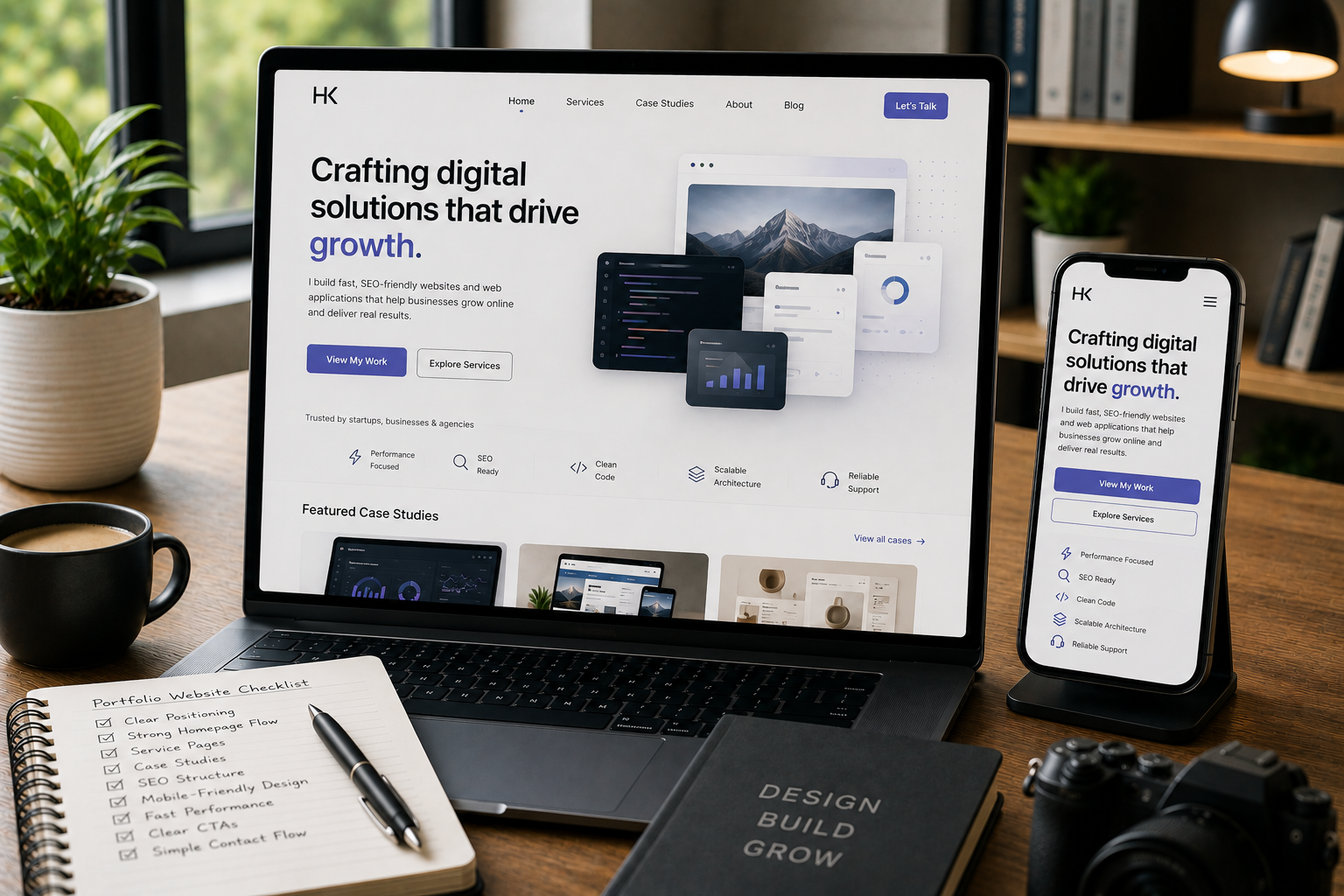
The hero section should explain what the portfolio is about. It should include:
- A clear headline
- A short supporting paragraph
- One main CTA
- Optional secondary CTA
- Visual or interface element that matches the brand Avoid vague lines that sound polished but say little. A good hero does not need to be loud. It needs to be clear.
Services Section
The services section should help visitors self-identify. For example:
- Website Design & Development
- React / Next.js Development
- WordPress Development
- WooCommerce Development
- Shopify Development
- Full-Stack Development
- SEO Engineering & Technical SEO
- API Integration & Automation Each service should explain what problem it solves, not only list the technology.
Make Case Studies the Core Proof System
Projects show what was built. Case studies show how thinking happened. That is why a product-style portfolio should treat case studies as a major content type. A weak project card may only show:
- Project title
- Image
- Tech stack
- Short description A stronger case study explains:
- Context
- Problem
- Goal
- Constraints
- Solution
- Implementation
- Features
- Technologies
- Outcome
- Lessons or decisions This helps the visitor understand how you approach work.
Case Study Structure
A practical case study page can include:
- Project overview
- Business problem
- Main goal
- Challenge points
- Solution points
- Key features
- Technology stack
- Implementation notes
- Result summary
- Final takeaway
- Related services
- CTA This structure makes the work easier to scan and easier to trust. The goal is not to invent results or exaggerate impact. The goal is to explain the work clearly.
Show Services as Productized Paths
A portfolio website feels more useful when services are structured like clear paths. Instead of only saying “I can build websites,” create service pages that explain the offer. For example, a React / Next.js Development page can explain:
- What type of websites and apps it covers
- When Next.js is the right choice
- What features can be built
- How SEO and routing are handled
- What the development process looks like
- What kinds of businesses it fits
- Related case studies
- Next step CTA This gives visitors a reason to explore. A service page should answer the questions a potential client would ask before contacting you.
Use Navigation Like a Product Menu
Navigation should make the portfolio easier to understand. A simple menu may include:
- Home
- Services
- Case Studies
- Blog
- About
- Contact For a more detailed portfolio, navigation can also include service dropdowns or grouped categories. But avoid making the menu too large. The goal is to help people move through the site naturally. If navigation feels confusing, the website feels less mature. A good portfolio navigation should support these visitor goals:
- Understand what you do
- See proof
- Learn how you think
- Contact you
- Explore a relevant service
Build Reusable Sections
A product-style portfolio should have consistency. That is where React and Next.js are useful. With reusable components, the website can use consistent sections across pages:
- Hero sections
- Service cards
- Case study cards
- CTA blocks
- FAQ sections
- Feature grids
- Process sections
- Technology cards
- Blog cards
- Testimonial or proof sections
- Contact blocks This helps the website feel like one connected system instead of separate pages designed one by one. Reusable sections also make future updates easier. If the case study card design changes, it can update everywhere. If the CTA style improves, it can stay consistent across the website.
Make the UI Feel Intentional
A portfolio that feels like a product should have clear interface decisions. This includes:
- Consistent spacing
- Readable typography
- Clear section hierarchy
- Strong contrast
- Predictable buttons
- Responsive layouts
- Smooth but not excessive animation
- Useful cards and grids
- Clean mobile navigation
- Clear visual grouping Visual design should support understanding. A common mistake is making a portfolio too decorative. Animations, gradients, effects, and interactions can look impressive, but if they make content harder to understand, they weaken the website. Good UI makes the visitor feel oriented.
Design Case Study Cards Like Product Cards
Case study cards should not be treated as simple thumbnails. A good case study card can show:
- Project title
- Short summary
- Category
- Services involved
- Technologies used
- Problem or outcome focus
- Visual preview
- Clear link to read more The card should help visitors decide which case study is relevant to them. For example, a founder may care about a SaaS dashboard. An ecommerce brand may care about a WooCommerce or Shopify project. A service business may care about a website redesign or SEO structure. Case study cards should make that difference easy to see.
Add Content Depth With Blog or Insights
A portfolio website becomes stronger when it includes useful writing. Blog content can show:
- How you think
- How you solve problems
- What technical decisions you make
- What clients should understand before building
- How you approach SEO, performance, CMS, ecommerce, and dashboards This is valuable because not every visitor is ready to contact immediately. Some are researching. Some are comparing options. Some are trying to understand what they need. A blog or insights section can bring those visitors into the website through useful content. It also supports SEO when topics are planned around real search intent.
Plan SEO Like a Website System
A portfolio website should not only rely on the homepage for search visibility. SEO should be planned across the full structure. Useful SEO pages may include:
- Main service pages
- Case study pages
- Blog posts
- Category pages
- Technology-focused pages
- Comparison articles
- Problem-focused guides For example:
- React / Next.js Development
- WordPress Development
- WooCommerce Development
- Shopify Development
- Technical SEO Services
- API Integration & Automation
- Dashboard Development Each page can target a specific topic and visitor intent. A product-style portfolio uses SEO as part of the architecture, not as an afterthought.
Use Clear CTAs Throughout the Journey
A portfolio should guide people toward action without being pushy. Useful CTAs include:
- View case studies
- Explore services
- Read the approach
- Start a project
- Contact for a consultation
- See related work
- Discuss your website The CTA should match the page. On a homepage, the CTA may invite visitors to view work or start a project. On a service page, it may invite them to discuss that service. On a case study, it may point to a related service. On a blog post, it may connect the topic to a relevant solution. Good CTAs make the website feel intentional.
Make the Contact Page Simple
A portfolio website can be strong, but if the contact page is weak, the final step suffers. A good contact page should include:
- Short explanation of who should reach out
- Simple form
- Relevant fields
- Optional budget or project type
- Email address if appropriate
- Expected next step
- Links to services or case studies Do not make the contact form too long unless the project requires qualification. The goal is to make reaching out feel easy and professional.
Use React or Next.js When the Portfolio Needs Scale
A simple portfolio can be built with many tools. But React or Next.js becomes useful when the portfolio needs more structure. React or Next.js works well when you need:
- Custom UI
- Reusable components
- Fast pages
- Clean routing
- Case study templates
- Blog structure
- SEO metadata control
- Animation control
- CMS integration
- Future dashboard or app features For a portfolio that is also a business website, Next.js can be a strong foundation because it supports both marketing pages and more advanced functionality. It can help the portfolio grow from a simple showcase into a full service website.
Avoid These Portfolio Mistakes
Showing Projects Without Context
A project screenshot is not enough. Explain the problem, role, decision-making, and result.
Making the Site Too Visual and Not Clear Enough
Beautiful design is useful, but clarity matters more. Visitors should quickly understand what you do.
Hiding Services
If you want clients, services should be clear. Do not make visitors guess what they can hire you for.
Weak Mobile Experience
Many visitors will open the portfolio on a phone. Mobile UX should feel just as intentional as desktop.
No SEO Structure
A portfolio can look excellent and still be hard to discover if services, case studies, and blog content are not structured properly.
No Clear CTA
If visitors like the work but do not know what to do next, the website is not guiding them well.
Portfolio Website Checklist
A product-style portfolio should include:
- Clear positioning
- Strong homepage flow
- Service pages
- Structured case studies
- Useful project cards
- About section with context
- Blog or insights section
- SEO-friendly page structure
- Reusable UI components
- Clear navigation
- Mobile-first design
- Fast loading pages
- Trust signals
- Clear CTAs
- Simple contact flow This makes the portfolio feel less like a static profile and more like a professional product experience.
Need a Portfolio Website With Product-Level UX?
If your current portfolio feels like a resume or a basic project gallery, it may need a stronger structure. Through React / Next.js Development, I can help build a portfolio website with clear positioning, reusable UI sections, structured case studies, service pages, SEO metadata, and a smoother visitor journey. The goal is to make the website feel like a product: clear, useful, scalable, and built around the people who visit it.
Final Recommendations
A portfolio website should do more than display work. It should explain your value, guide visitors, show proof, support SEO, and make the next step easy. Start by improving:
- Positioning
- Homepage flow
- Service clarity
- Case study structure
- Navigation
- UI consistency
- SEO pages
- Calls to action
- Contact experience A portfolio feels like a product when every section has a purpose. It does not just say, “Here is my work.” It says, “Here is what I solve, how I think, what I have built, and how we can work together.”
FAQ
What does it mean for a portfolio website to feel like a product?
It means the portfolio is structured like a guided experience, not just a list of projects. It explains positioning, services, proof, case studies, process, and next steps clearly. A product-style portfolio helps visitors understand value without forcing them to figure everything out on their own.
Should a portfolio website include case studies?
Yes. Case studies help visitors understand how you solve problems, what kind of work you do, what decisions you made, and why the project mattered. A project gallery shows output. A case study shows thinking, process, and business value.
Is React or Next.js good for a portfolio website?
Yes. React and Next.js work well for custom portfolio websites that need reusable sections, strong UI, clean routing, SEO-friendly pages, and scalable case study structures. They are especially useful when the portfolio is also a service website, content system, or long-term personal brand platform.
How can a portfolio website generate better leads?
A portfolio can generate better leads by clearly showing services, proof, case studies, process, problem fit, trust signals, and calls to action across the visitor journey. The website should help the right visitors understand that your work matches their needs.
What pages should a professional portfolio website have?
A strong portfolio usually needs a homepage, services, case studies, about page, blog or insights, contact page, and sometimes dedicated landing pages for specific service areas. The exact structure depends on the goal, but every page should help visitors understand, trust, or take action.