Article
A practical WordPress structure keeps content flexible for clients while protecting design, layout, SEO, and site quality.
Learn how reusable sections, ACF fields, custom post types, roles, and clear CMS rules help clients edit WordPress content safely.
How I Structure WordPress Websites So Clients Can Edit Content Safely
A WordPress website should not only look good on launch day. It should also be easy to manage after launch. For many business owners, ecommerce brands, SaaS teams, founders, and service companies, the real problem starts after the website is delivered. They want to update service pages, publish blogs, change banners, add case studies, manage products, or edit landing page content. But if the website is not structured properly, every small update becomes risky. One wrong click can break spacing. A deleted block can damage the layout. A copied section can create inconsistent design. An image upload can affect performance. A missing SEO field can hurt search visibility. That is why I do not treat WordPress as just a page builder. I treat it as a content management system. The goal is simple: clients should be able to edit the content they own, without accidentally breaking the design, layout, SEO structure, or technical quality of the website.
The Main Principle: Separate Content From Layout
The biggest mistake in many WordPress builds is giving clients too much layout control when they only need content control. There is a difference between editing content and designing a page. A client should be able to update:
- Page headings
- Paragraphs
- Button text
- Button links
- Images
- FAQs
- Service details
- Product highlights
- Blog content
- Case study results
- SEO titles and descriptions But most clients do not need to manually control:
- Section spacing
- Grid structure
- Responsive breakpoints
- Animation behavior
- Font scale
- Reusable card layouts
- Schema structure
- Design system rules When these two responsibilities are mixed together, the website becomes fragile. A safer WordPress structure gives the client controlled fields to edit, while the theme or templates handle presentation.
Why Safe Editing Matters for Business Websites
A business website is not a static brochure anymore. It usually needs regular updates. A service business may need to add new services. An ecommerce brand may need to update product information. A SaaS team may need new feature pages. A founder may need to publish thought leadership content. A local business may need location pages, FAQs, offers, or seasonal landing pages. If every change requires a developer, the website becomes slow to maintain. But if the client has unrestricted control, the website can become inconsistent very quickly. Safe editing solves both problems. It gives the client independence while still protecting the website.
How I Think About WordPress CMS Structure
Before building, I usually ask one important question: What content will the client need to update regularly? That answer decides the CMS structure. For example, a simple business website may need editable fields for:
- Homepage hero section
- Services
- Testimonials
- FAQs
- Blog posts
- Contact details
- CTA sections A more advanced website may need:
- Case studies
- Industries
- Team members
- Resources
- Product collections
- Pricing tables
- Locations
- Landing pages
- Integration pages Instead of placing everything into normal WordPress pages, I separate repeatable content into its own structure. That is where custom post types, ACF fields, reusable sections, and roles become useful.
Custom Post Types: Organizing Repeatable Content
Custom post types are one of the most important parts of a scalable WordPress CMS. WordPress already has built-in content types like posts and pages. But many websites need more than that. For example:
- Services
- Case studies
- Products
- Testimonials
- Team members
- Locations
- Resources
- Events
- FAQs
- Portfolio items These should not always be managed as normal pages or random blocks. They should often have their own content area inside the WordPress admin.
Example: Service Pages
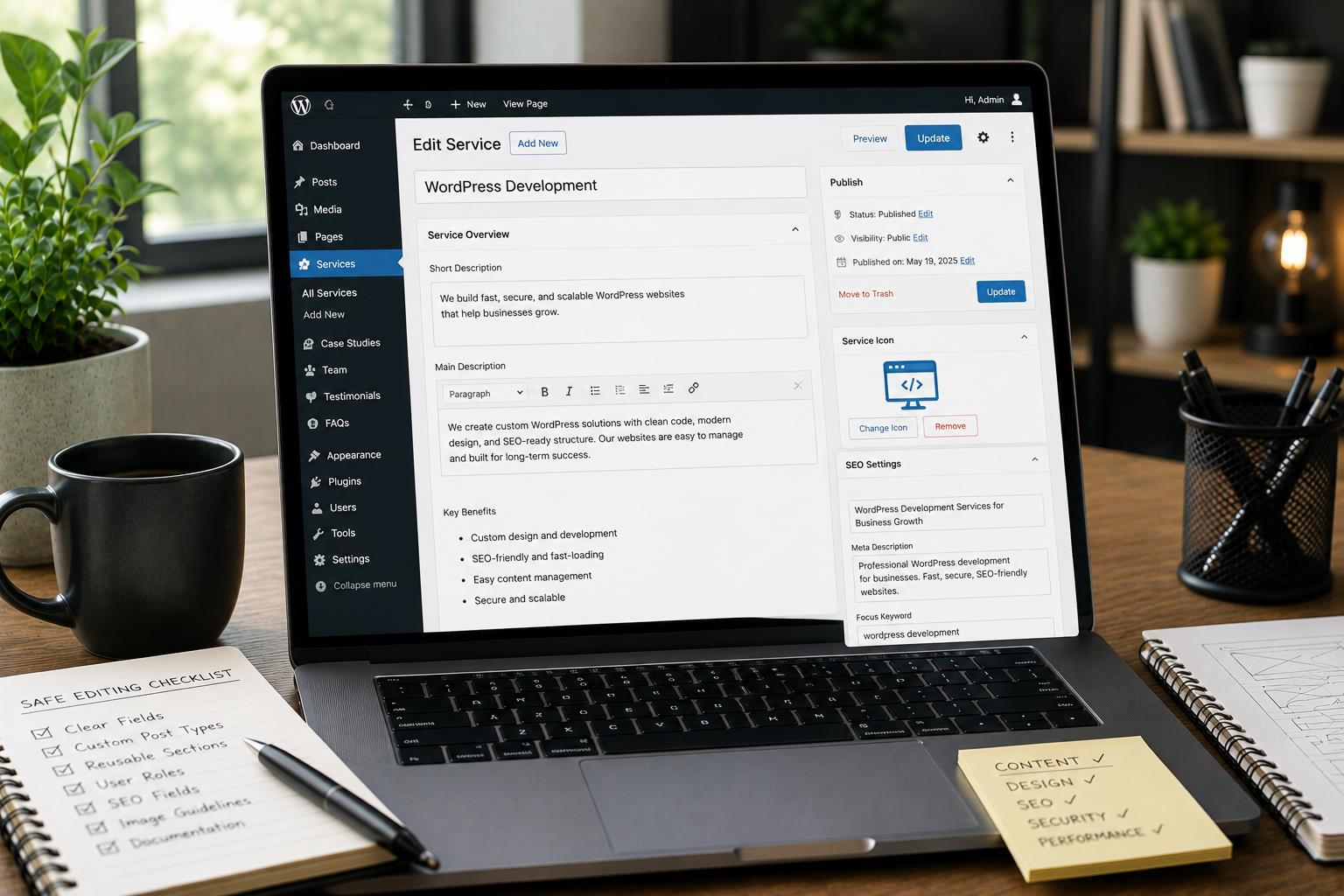
For a service business, I may create a custom post type called Services. Each service can have structured fields like:
- Service title
- Short summary
- Main description
- Key benefits
- Process steps
- Related technologies
- FAQs
- CTA text
- SEO title
- SEO description The client does not need to design each service page manually. They only fill in the content fields. The template handles the layout. This keeps every service page consistent.
Example: Case Studies
For a portfolio or agency website, case studies can be managed as a custom post type. Each case study may include:
- Project title
- Industry
- Project type
- Challenge points
- Solution points
- Outcome points
- Technologies used
- Services provided
- Results summary
- Featured image
- SEO metadata This is safer than creating each case study from scratch with manual blocks. It also makes filtering, sorting, and related content easier later.
ACF: Giving Clients the Right Fields
ACF, or Advanced Custom Fields, is useful when the website needs controlled editing. Instead of giving the client one large open content area, ACF lets the developer create specific fields for specific content. For example, a hero section can have:
- Eyebrow text
- Main heading
- Supporting paragraph
- Primary button label
- Primary button URL
- Secondary button label
- Secondary button URL
- Background image The client can update the content, but they cannot accidentally remove the layout structure. That is the main value.
Why ACF Works Well for Client Editing
ACF helps because it makes the admin experience clear. Instead of asking the client to guess where content goes, the fields explain the structure. A good ACF setup should feel simple:
- Clear field labels
- Helpful instructions
- Logical field groups
- Limited choices where needed
- Repeaters only when useful
- Image fields with expected size guidance
- Link fields instead of plain URL fields when possible The goal is not to make the backend complex. The goal is to make editing predictable.
Reusable Sections: Keeping Pages Consistent
Many WordPress websites use the same sections across multiple pages. For example:
- CTA banners
- FAQ sections
- Testimonial blocks
- Service cards
- Feature grids
- Logo strips
- Process sections
- Pricing highlights
- Contact blocks If each of these is manually built on every page, consistency becomes difficult. Reusable sections solve this. There are a few ways to handle reusable sections in WordPress:
- Gutenberg block patterns
- Custom blocks
- ACF flexible content
- Template parts
- Global options pages
- Theme-level components The best option depends on the website. For a simple site, reusable blocks or patterns may be enough. For a custom business website, ACF flexible content can work well. For a more controlled build, custom templates and fields are usually better.
ACF Flexible Content: Useful but Needs Control
ACF Flexible Content lets clients choose from predefined section types. For example, a page may allow sections like:
- Hero section
- Text and image section
- Feature grid
- Testimonial section
- FAQ section
- CTA banner This gives flexibility without giving complete design freedom. The client can build pages using approved components. The design stays consistent because each component is already styled. However, flexible content should not become too open. If there are too many section choices, too many layout options, or too many styling controls, the CMS becomes confusing. I prefer a controlled set of useful sections rather than a large library of rarely used blocks.
WordPress Roles: Protecting the Website
Safe editing is not only about fields. It is also about access. Not every user should have Administrator access. For most client teams, the roles should be planned carefully. Common roles include:
- Administrator
- Editor
- Author
- Contributor
- Shop Manager
- SEO Manager
- Custom content editor role For example, a marketing team may only need access to pages, blogs, case studies, and SEO fields. They may not need access to plugins, theme settings, users, or critical site configuration. A safer setup may include a custom role that can:
- Edit pages
- Publish blog posts
- Upload media
- Edit case studies
- Update reusable content
- Manage SEO fields But cannot:
- Install plugins
- Change themes
- Edit code
- Modify users
- Change critical settings This protects the website from accidental damage.
Media Upload Rules Matter
One common issue with client-managed websites is poor media handling. Clients may upload very large images, inconsistent file names, or images without alt text. Over time, this can hurt performance and SEO. A good CMS setup should include media guidance. For example:
- Recommended image dimensions
- File size guidance
- Clear image field labels
- Alt text reminders
- Cropping rules where needed
- Separate fields for mobile images if required The CMS should not only allow editing. It should guide better editing.
SEO Fields Should Be Part of the Workflow
Technical SEO is easier when the CMS structure supports it. For content-managed WordPress websites, SEO should not be an afterthought. Important SEO fields may include:
- Meta title
- Meta description
- Open Graph title
- Open Graph description
- Featured image
- Canonical URL when needed
- FAQ content
- Breadcrumb structure
- Slug control For blogs, services, products, and case studies, the editing workflow should make SEO fields easy to find and complete. This helps the client publish content with fewer mistakes.
Decision Point: Page Builder or Structured CMS?
Page builders can be useful, especially for marketing teams that want visual control. But they are not always the best choice for long-term structure. A page builder may be good when:
- The client needs frequent landing page experiments
- The team understands design basics
- Speed of layout creation matters
- The website is campaign-heavy
- The design system is simple A structured CMS approach is better when:
- Consistency matters
- SEO structure matters
- Content is repeatable
- The website has many services, products, or case studies
- Multiple users manage content
- The client should not touch layout rules Many websites can also use a hybrid approach. For example, core pages may use structured templates, while campaign landing pages may use controlled reusable blocks.
Checklist: What a Safe WordPress CMS Should Include
A client-friendly WordPress website should include:
- Clear content areas
- Custom post types for repeatable content
- ACF fields where structure is needed
- Reusable sections for common layouts
- Limited design controls
- Proper user roles
- SEO metadata fields
- Image upload guidance
- Helpful field instructions
- Preview-friendly editing
- Simple admin labels
- Backup and revision support
- Documentation for common updates This makes the website easier to manage after launch.
Example Structure for a Service Business Website
For a service business, I may structure WordPress like this:
Pages
Used for main static pages:
- Home
- About
- Contact
- Privacy Policy
- Terms
Services
A custom post type for each service:
- Website Design
- WordPress Development
- SEO
- Automation
- Consulting Each service has fields for overview, benefits, process, FAQs, technologies, and CTA.
Case Studies
A custom post type for proof and portfolio content. Each case study has fields for challenge, solution, outcome, services, technologies, and results.
Blog
Used for educational content and SEO publishing. Blog posts include categories, tags, author, excerpt, featured image, and SEO fields.
Global Options
Used for content that appears across the website:
- Header CTA
- Footer content
- Contact details
- Social links
- Default CTA section
- Company information This structure keeps the website organized.
Example Structure for an Ecommerce Website
For an ecommerce brand, the CMS may need a different structure. The client may need to manage:
- Products
- Categories
- Collection pages
- Product FAQs
- Size guides
- Shipping information
- Offer banners
- Trust badges
- Landing pages
- Blog content In this case, WooCommerce handles product structure, but custom fields may still be useful for product highlights, comparison points, delivery notes, or SEO content. The goal is the same: make updates safe and consistent.
The Admin Experience Should Be Designed Too
A good website is not only designed for visitors. It should also be designed for the people managing it. The WordPress admin should feel clear. That means:
- Field groups should be organized
- Labels should use client-friendly language
- Optional fields should be clearly marked
- Repeater fields should not be overused
- Help text should explain what to enter
- Content sections should match the frontend
- Unused menu items should be hidden when possible If the admin experience is confusing, the client will either avoid updating the site or make mistakes.
Documentation Helps Clients Edit Confidently
Even a well-structured CMS benefits from simple documentation. This does not need to be complicated. A useful handover guide can explain:
- How to edit pages
- How to add a blog post
- How to update services
- How to add a case study
- How to upload images
- How to edit SEO fields
- What not to change
- Which role each team member should use The goal is to reduce fear. Clients should understand what they can safely edit and when they should ask for developer support.
What I Avoid in Client-Editable WordPress Builds
There are a few things I try to avoid when the goal is safe editing.
Too Many Design Controls
If every section has controls for color, font size, spacing, alignment, shadows, borders, and layout, the client can easily create inconsistent pages. Most business websites do not need that level of control.
One Large Content Field for Everything
A single open editor field may be fine for blog posts, but it is not ideal for structured pages. For important pages, structured fields are usually safer.
Administrator Access for Everyone
Giving full admin access to every client user is risky. It is better to create roles based on real responsibilities.
Unclear Field Names
Fields like Text 1, Image 2, or Section Copy are not helpful. Fields should match the actual content purpose.
Hardcoded Content Everywhere
If every small text change requires a developer, the CMS is not serving the client properly. Important business content should be editable where appropriate.
A Good CMS Gives Control Without Chaos
The best WordPress editing experience is balanced. Clients should not feel locked out of their own website. But they also should not be responsible for protecting every technical and design detail. A safe CMS gives them the right level of control. They can update content, publish new material, manage important pages, and keep the website current. At the same time, the design system, templates, SEO structure, and technical setup remain protected. That is the difference between a basic WordPress website and a well-planned WordPress CMS.
Need a Safer WordPress Editing System?
If your current WordPress website is difficult to update, easy to break, or too dependent on developers for small content changes, the structure may need to be improved. Through WordPress Development, I can help plan and build a cleaner CMS setup with reusable sections, custom post types, ACF fields, user roles, and SEO-friendly content workflows. The goal is not just to build a website. The goal is to build a website your team can actually manage with confidence.
Final Recommendations
For most business websites, I recommend starting with these decisions:
- Decide what content the client should edit
- Separate repeatable content into custom post types
- Use ACF fields for structured sections
- Keep layout rules inside templates
- Give users the correct roles
- Add SEO fields into the publishing workflow
- Use reusable sections for common content blocks
- Keep the admin simple and clearly labeled
- Provide basic documentation after launch This approach keeps WordPress flexible without making it fragile. A client-editable website should not mean an unprotected website. With the right structure, WordPress can be both easy to update and safe to maintain.
FAQ
Why should a WordPress website be structured for safe client editing?
A safe editing structure lets clients update real content without accidentally breaking layouts, removing important sections, damaging SEO fields, or creating inconsistent pages. This is especially important for websites that change often. If the client needs to publish blogs, add services, update case studies, or manage product information, the CMS should support those tasks clearly.
What are custom post types in WordPress?
Custom post types are separate content areas for repeatable items such as services, case studies, products, team members, locations, resources, or testimonials. They help organize content better than using normal pages for everything. They also make it easier to create consistent templates, filters, archives, and related content sections.
How does ACF help with client editable websites?
ACF lets developers create clear fields for specific content, so clients edit titles, descriptions, images, links, highlights, and sections without touching the page layout. This makes editing safer because the client controls the content, while the website template controls the design.
Should clients use a page builder or custom fields?
Both can work, but custom fields are better when design consistency, structured content, SEO control, and safe editing are more important than full visual freedom. Page builders can be useful for landing pages and campaign pages. But for services, case studies, products, and important business pages, a structured CMS is often more reliable.
What WordPress roles should clients have?
Most clients should use Editor or custom roles instead of full Administrator access, especially when they only need to update content, publish blogs, or manage products. Administrator access should usually be limited to people who understand the technical risk of changing plugins, themes, users, and site settings.